FAQ
After setup you'll find two versions of Limagito in it's install directory. An application version (= Limagito.exe) and a service version (= LimagitoSrv.exe).
Some important FAQ:
1) Limagito is used as application
- You can run the application version without the service version. The service version isn't necessary.
- The application version will use it's own settings.
2) Limagito is used as a service
- You can run the service version without the application version.
- You'll only need the application version as a setup tool for the service.
- You'll need to (re)export the settings to the service every time you change something in the setup.
- When you hit press the export button and the Limagito service is already running then it will automatically:
- Stop the service
- Export the settings
- Restart the service
- The service version will use it's own settings (the export will create a renamed copy of the application version settings).
- Please close the application version when you're done. It's not a good idea to let them both run.
- When you open the the application version and the Limagito service is already running then it will set the status of all moving rules in the application version to 'Rule Enabled & Not Scanning'. We don't want the application version to interfere with the running Limagito service.
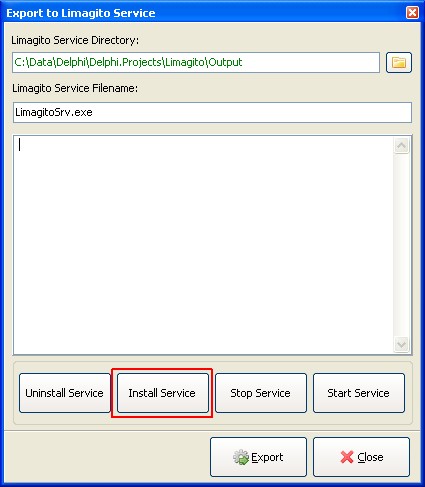
Install LimagitoSrv using the 'Install Service' button on the 'Export to Limagito Service' form.

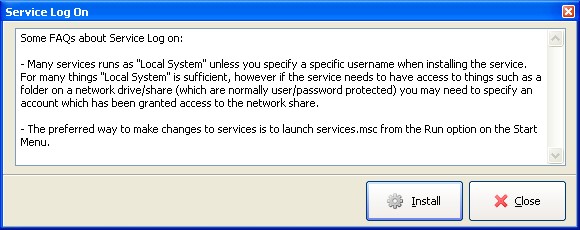
"Please read the following information carefully"
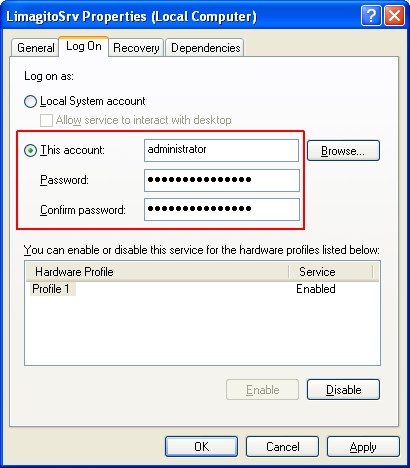
- Start and Setup Limagito
- Export Limagito settings to LimagitoSrv using the 'Export to Service' button

- Select LimagitoSrv.exe directory and click 'Export' button
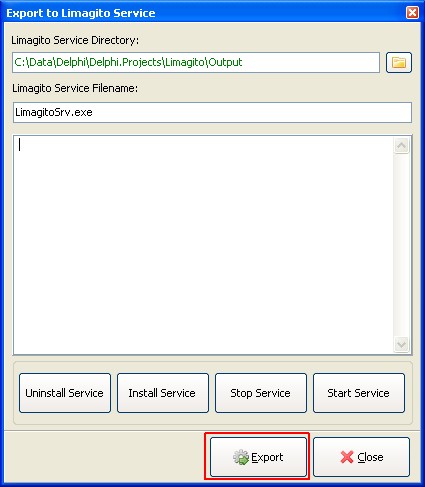
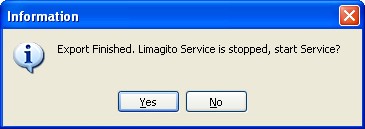
- After export you'll be asked to start the service. Click Yes and exit the Limagito application. Never run Limagito and LimagitoSrv with the same settings at the same time.
Copyright © 2012, www.limagito.com